 SweeperX
Live Photos: keep the picture, drop the three seconds around it
When Live Photos is on, the camera records about 1.5 seconds either side of the shutter and keeps that clip attached to the photo. It is a genuinely good feature for a small number of pictures — a child laughing, a wave breaking — and dead weight for the several thousand others, where you get a video of a phone being lowered.
That attached video is typically two to three times the size of the still it is wrapped around. Converting a Live Photo to a still keeps the image exactly as you framed it and discards only the motion.
What conversion changes
- The photo is unchanged. Same resolution, same framing, same moment. It is the key frame you already see in your library.
- The motion is gone. Long-press does nothing afterwards, and the Loop and Bounce effects are no longer available for that photo.
- The saving is real and immediate. On the dashboard capture on the features page, the Live Photos category alone accounts for 87.8 MB on a lightly used device. On a library of ten thousand, it runs to gigabytes.
You pick which ones
The app lists your Live Photos with the size of the attached video for each, so the handful worth keeping in motion are easy to leave alone. There is no all-or-nothing switch, because the whole point is that the feature is worth it for a few photos and not for the rest.
If you would rather stop creating them in the first place, that is a setting in the Camera app rather than something an app can change for you: the guide covers how to turn it off and make the setting stick, which iOS makes less obvious than it should be.
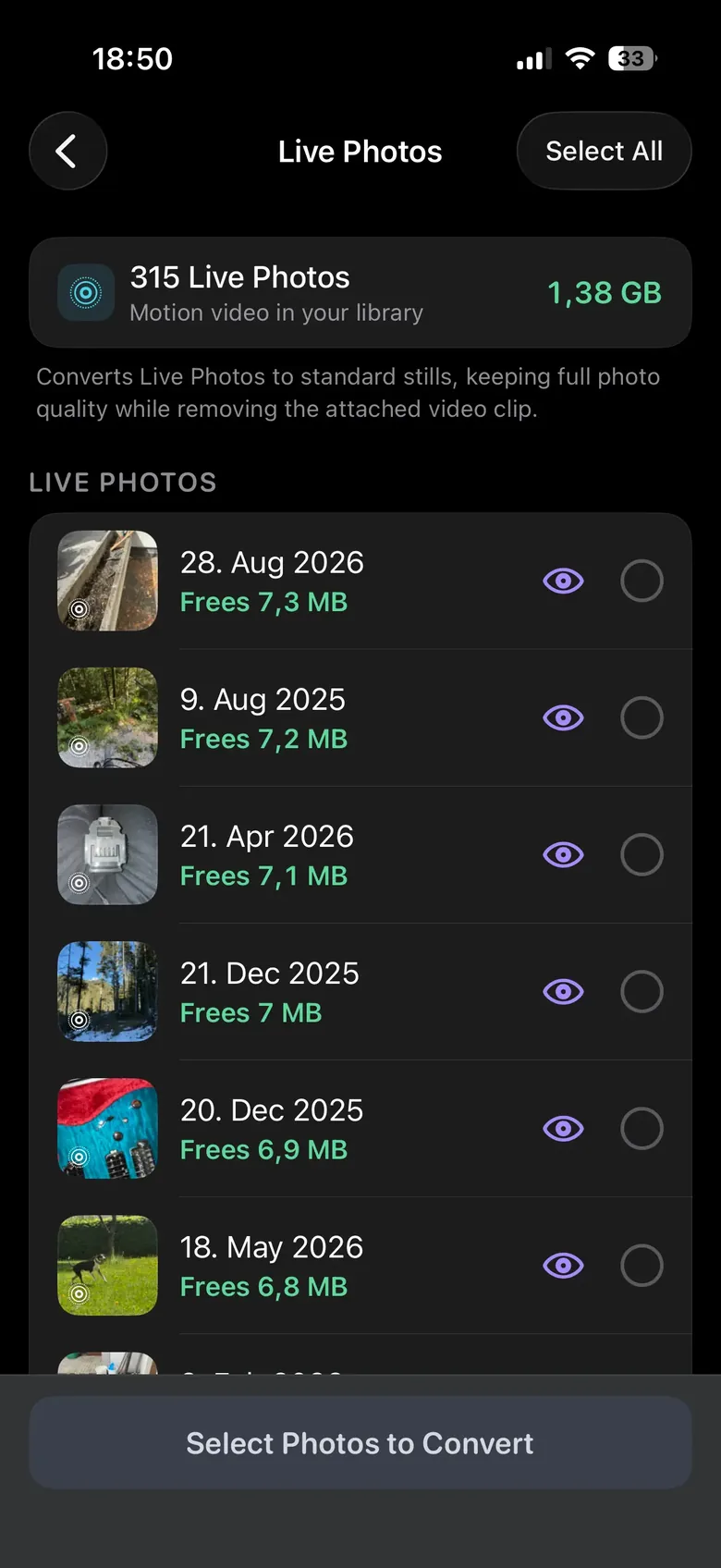
The header tells you the size of the problem before you scroll: on the library below, 315 Live Photos are carrying 1.38 GB of attached video between them. Each row then shows what converting that one photo would free, so the few you want to keep in motion cost you nothing but a decision.
Nothing is removed when you tap it
Selections are staged. You open the review bin, see the whole batch with its total, undo anything individually, and confirm. Confirmed photos and videos go to the Photos app’s Recently Deleted album, where iOS holds them for 30 days — two undo steps before anything is permanent, and the reason your storage figure moves later than you expect.
What it will not do
- It will not convert in bulk without asking. You select; it converts.
- It cannot bring the motion back. Once the batch is confirmed and the 30-day Recently Deleted window has passed, the video half is gone for good.
- It will not change your camera settings. New photos keep being Live Photos until you change that yourself.
Read next: Live Photos Are Quietly Costing You Gigabytes — how much they actually take, and how to stop the camera making more of them.