 SweeperX
Compress videos on iPhone, with the saving shown first
An iPhone shooting 4K at 60 fps writes roughly 400 MB a minute. Most of that footage is never watched at 4K, never watched on anything larger than the phone, and in many cases never watched again at all. Re-encoding it at 1080p keeps a video that looks the same on the device that shot it and takes a fraction of the space.
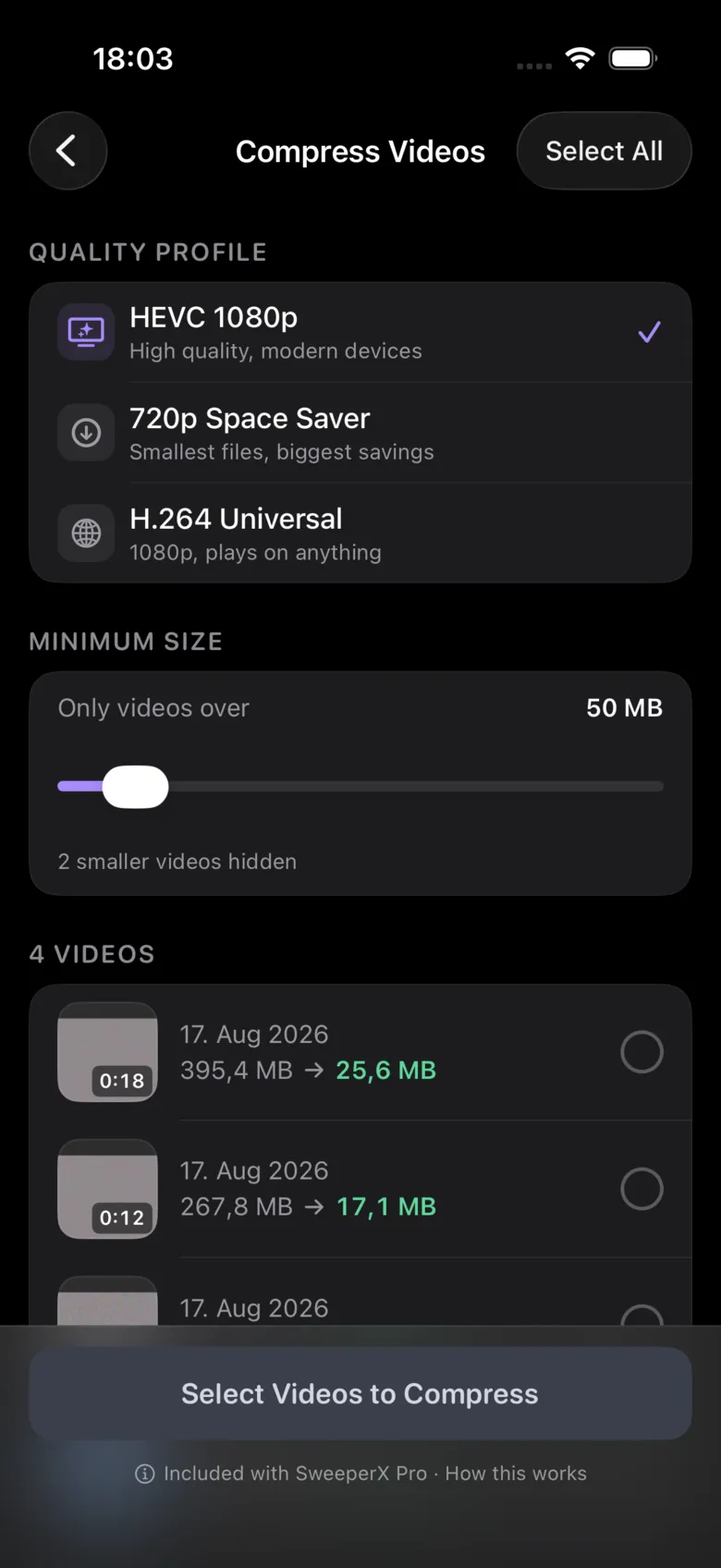
Three profiles, no guessing
- HEVC 1080p — high quality, modern devices. The default, and the right answer for footage you might actually rewatch.
- 720p Space Saver — smallest files, biggest savings. For the clips you are keeping out of completeness rather than affection.
- H.264 Universal — 1080p, plays on anything. Choose this if a video is going to be sent to someone on an older device or a Windows machine.
A minimum size slider hides everything below a threshold you set, so a library of four hundred short clips does not bury the four videos that are actually costing you space.
The estimate comes before the commitment
Each video in the list shows its current size and what it would become under the profile you picked. In the capture above, a 395.4 MB clip resolves to 25.6 MB and a 267.8 MB clip to 17.1 MB. Your own numbers will differ — they depend on what was filmed, how much motion is in it, and what it was shot at — but you see yours before you select anything, not after.
As with photos, the compressed file is written and verified before the original is staged, and the original is only removed after you confirm the batch in the review bin.
What it will not do
- It will not upscale or repair. Compression makes a file smaller; it cannot make shaky 720p footage better.
- It will not touch audio you would miss. The soundtrack is re-encoded, not discarded.
- It will not run in the background without you. Encoding video is heavy work and it happens while you watch it happen.
- It will not send a frame off the device. No cloud transcode, no upload, no account. Airplane Mode changes nothing.
Nothing is removed when you tap it
Selections are staged. You open the review bin, see the whole batch with its total, undo anything individually, and confirm. Confirmed photos and videos go to the Photos app’s Recently Deleted album, where iOS holds them for 30 days — two undo steps before anything is permanent, and the reason your storage figure moves later than you expect.
Read next: How to Compress a Video on iPhone Without Losing Quality — what a codec actually throws away, and how to choose a profile you will not regret.