 SweeperX
Compress photos without losing the picture
A modern iPhone photo is already efficiently encoded. The oversized ones usually arrived from somewhere else: a screenshot saved as PNG, an image exported at full quality by another app, a scan, a photo someone sent you from a camera. Those files can be several times larger than an equivalent photo the camera took, for no visible benefit.
Compress Photos finds them, shows you the size each one would become, and re-encodes the ones you select.
How it works
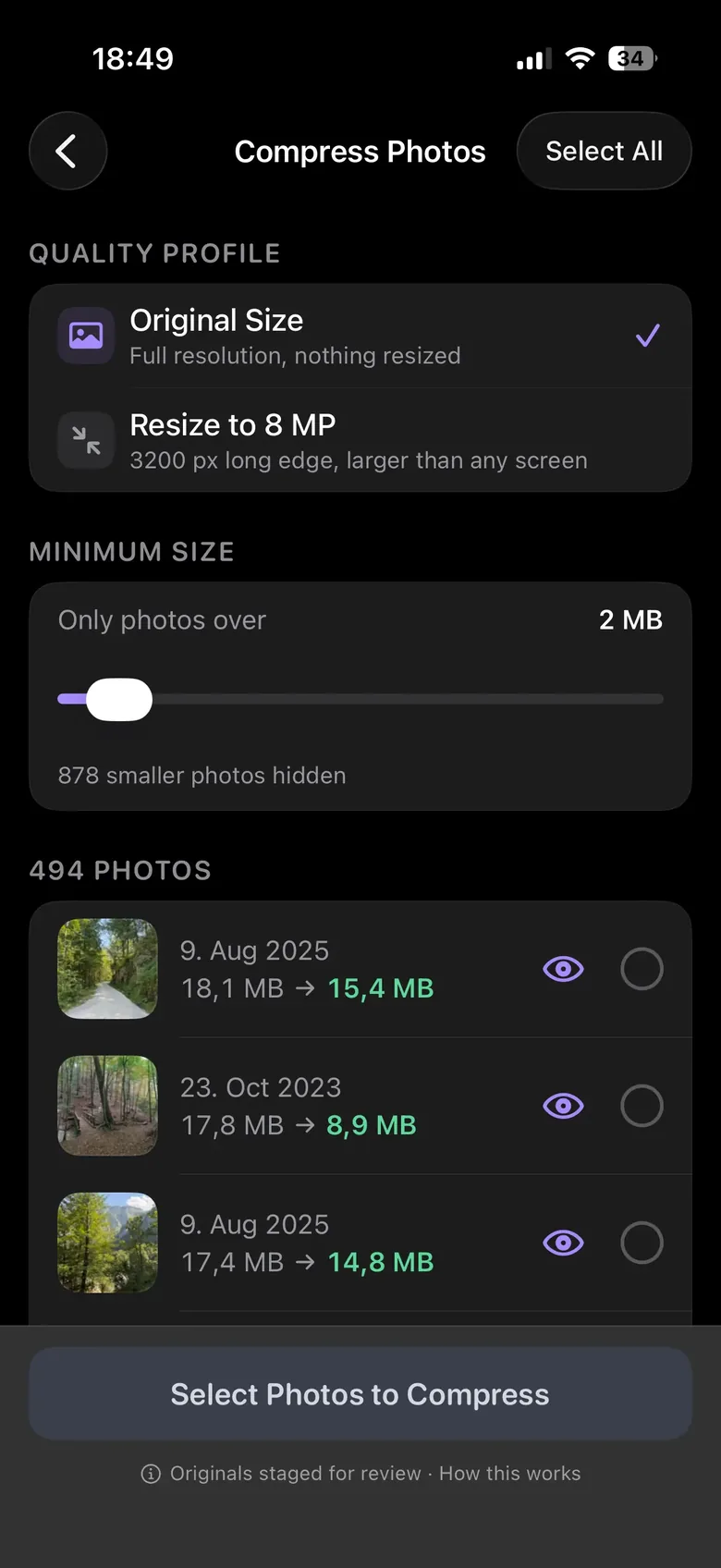
You choose the quality. The app shows the estimated result per photo before you commit to anything, so the trade is visible rather than promised: this file is 8.4 MB and would become 1.2 MB, and you can decide whether that photo is one you care about at full size.
The sequence matters more than the codec. The new file is written and verified first. Only then is the original staged for removal, and only after that do you confirm the batch. At no point does the app delete something on the promise of replacing it.
Two profiles and a floor
Original Size re-encodes at full resolution: nothing is resized, nothing is cropped, and the photo you get back has the pixel dimensions of the one you had. Resize to 8 MP caps the long edge at 3200 px — still larger than any screen you are likely to own, and considerably smaller on disk. Screenshots and exports from other apps are usually the photos worth resizing; the ones your camera took are usually not.
A minimum size slider sets the floor. Everything below it is hidden rather than listed, and the app tells you how many it hid, so a few thousand small stills do not bury the few hundred that are actually costing you space.
What it will not do
- It will not compress silently. Nothing is re-encoded until you select it.
- It will not compress twice. Photos already at a sensible size are not offered, because re-encoding an efficient file makes it worse and barely smaller.
- It will not pretend the loss is free. Re-encoding a photo is lossy. The original is gone once you confirm and the 30-day Recently Deleted window closes. If a picture matters at full resolution, leave it alone — the app will not talk you into it.
- It will not upload anything to compress it. The encoding runs on your phone’s own hardware, which is also why it works in Airplane Mode.
Nothing is removed when you tap it
Selections are staged. You open the review bin, see the whole batch with its total, undo anything individually, and confirm. Confirmed photos and videos go to the Photos app’s Recently Deleted album, where iOS holds them for 30 days — two undo steps before anything is permanent, and the reason your storage figure moves later than you expect.
Bigger win first: video is almost always the larger problem. Compress Videos routinely recovers gigabytes where photos recover megabytes, and the guide explains what actually gets thrown away.