 SweeperX
Swipe Declutter: the photos no algorithm can group for you
Automatic grouping handles the redundant: two copies of one image, nine frames of one burst, a 400 MB video. It cannot handle the merely unwanted. The photo of a car park space, the picture that did not come out, the four shots of a menu — each is unique, each is technically fine, and each is worthless to everyone except the person who took it.
Swipe Declutter is the tool for that. One photo fills the screen. You keep it or you discard it. Then the next one.
Why one at a time is the right shape
A grid of two hundred thumbnails invites you to select fast and regret it later. A single photo at full size asks one question you can actually answer, and it takes about a second. Working through a few hundred photos in a sitting is realistic; auditing a grid of two hundred is not.
There is a Quick Swipe entry on the dashboard for when you have five minutes rather than an evening. It opens on a shortlist rather than the whole library.
The screen is built so you always know where you are. The header counts your position in the pass — 44 of 1,670 — with a progress bar under it, the card carries its own size and date, and a running total shows how much you have queued in this sitting. There is an Undo in the corner for the swipe you regret the instant you make it, before you get anywhere near the review bin.
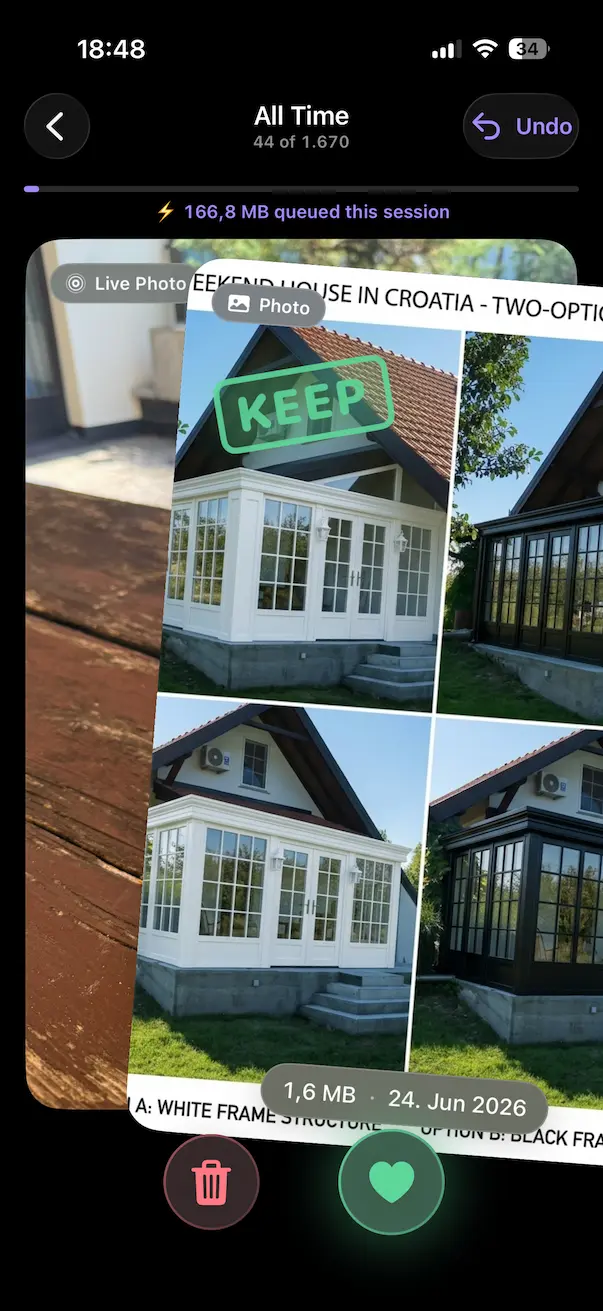
Discard is not delete
A discard swipe stages the photo. It does not remove it. Everything you discard lands in the same review bin the other tools use, and sits there until you open it and confirm the batch. If you swiped too fast on twenty photos, you undo them in the bin, individually, before anything happens.
Nothing is removed when you tap it
Selections are staged. You open the review bin, see the whole batch with its total, undo anything individually, and confirm. Confirmed photos and videos go to the Photos app’s Recently Deleted album, where iOS holds them for 30 days — two undo steps before anything is permanent, and the reason your storage figure moves later than you expect.
What it will not do
- It will not decide for you. There is no auto-discard, no confidence threshold, nothing that swipes on your behalf.
- It will not lose your place quietly. Photos you have already judged do not come back around in the same pass.
- It will not need a connection. Like everything else in the app, it runs against your local library with the radios off.
The reclaimed total from swiping is tracked separately from the other tools, so you can see what the slow manual pass actually bought you. In practice it is usually the smallest number on the impact screen and the one people are most attached to, because every megabyte of it was a decision.
Related: Duplicates & Similar handles the redundant photos first, which is worth doing before you start swiping — there is no point judging nine frames of one burst one at a time.