 SweeperX
Home Screen widgets: the number before the warning
Nobody opens Settings to check free space. They find out when a video stops recording, when an update refuses to install, or when the camera will not take the picture they are standing in front of. The information was available the whole time; it was just somewhere nobody looks.
The widgets put it where you already look forty times a day, and they do it without asking for anything: no notifications, no background scanning, no badge on the app icon.
Three widgets, three questions
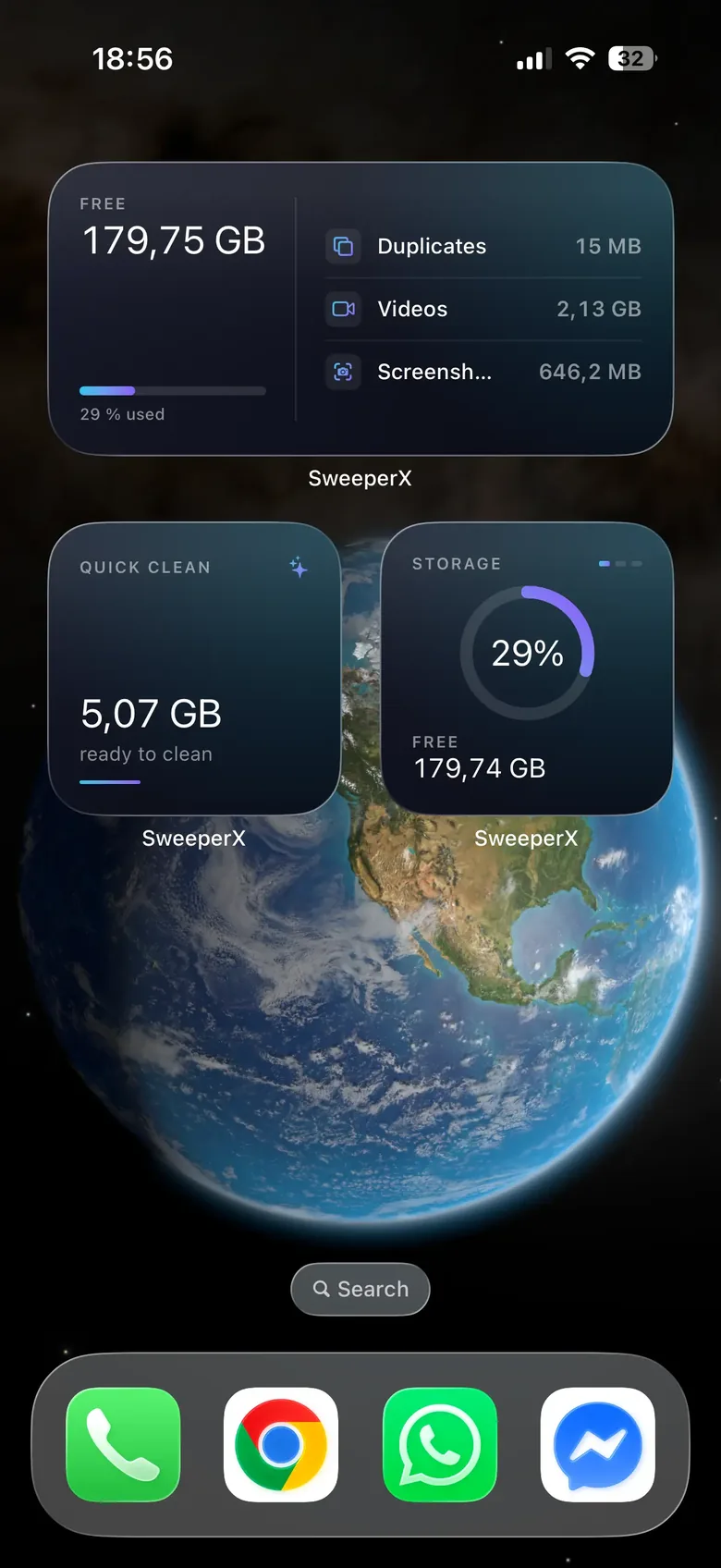
- Storage — small. A ring showing the percentage used and your free space in gigabytes. The one-glance answer to “am I fine?”
- Quick Clean — small. How much SweeperX currently reckons is reclaimable, from the last scan it ran. The answer to “is it worth opening the app?”
- Storage detail — medium. Free space and percentage used alongside the top categories with their sizes: duplicates, videos, screenshots. The answer to “where is it actually going?”
It is a snapshot, and iOS decides when to refresh it
There is a detail worth pointing out in that capture. The medium widget reads 179,75 GB free and the small one reads 179,74 GB, photographed at the same second. Neither is wrong. iOS refreshes widgets on its own schedule, a budget it hands out across every widget on the phone, so two widgets from the same app can be showing measurements taken minutes apart.
That is how every widget on iOS works, and it is the honest framing for this one: a widget is a recent reading, not a live meter. Treat the number as “roughly this, as of recently”. When you need the current figure, tap the widget — it opens the app, which measures properly.
The same applies to Quick Clean. A widget gets a few seconds of runtime and a small slice of memory, which is nowhere near enough to walk a photo library, so it shows what the app found the last time you ran a scan. Open the app, let it scan, and the widget catches up.
The widgets are as local as the app
A storage widget only needs two things: how full the phone is, and what the last scan found. Both already exist on the device. Nothing is fetched, nothing is reported, and no part of this needs a network connection — which is why the widgets work identically in Airplane Mode. The same App Privacy Report check that covers the app covers its widgets, because on iOS they are the same app.
What they will not do
- They will not clean anything. There is no button that deletes from the Home Screen. Widgets report; removal happens in the app, staged into the review bin, confirmed by you.
- They will not scan in the background. Nothing runs while you are not looking. That is a deliberate limit, and it is also why the figure can be a few days old.
- They will not nag. No notifications, no “you have not cleaned in 14 days”. If the number is fine, you never think about it, which is the point.
- They will not show anyone your photos. The widgets display sizes and counts. Nothing on your Home Screen or in the app switcher reveals what is in your library.
Related: Lifetime Impact is the other tool that only reports — the running total of what you have already recovered, broken down by which tool found it.