 SweeperX
Lifetime Impact: a total you can audit, not a badge
Most cleaner apps show you a triumphant figure after a cleanup and then lose it. SweeperX keeps a running total instead, and — more usefully — keeps the breakdown behind it. A headline saying you have reclaimed 4 GB is a claim. The same 4 GB split across the six tools that recovered it, with an item count beside each, is something you can compare against what you remember doing.
What the number counts
Every time you confirm a batch in the review bin, the bytes actually removed are added to the lifetime total and attributed to the tool that found them. Nothing else is counted. Items you staged and then undid contribute nothing, because they were never removed; a scan that found 12 GB of candidates and ended with you selecting none moves the total by zero.
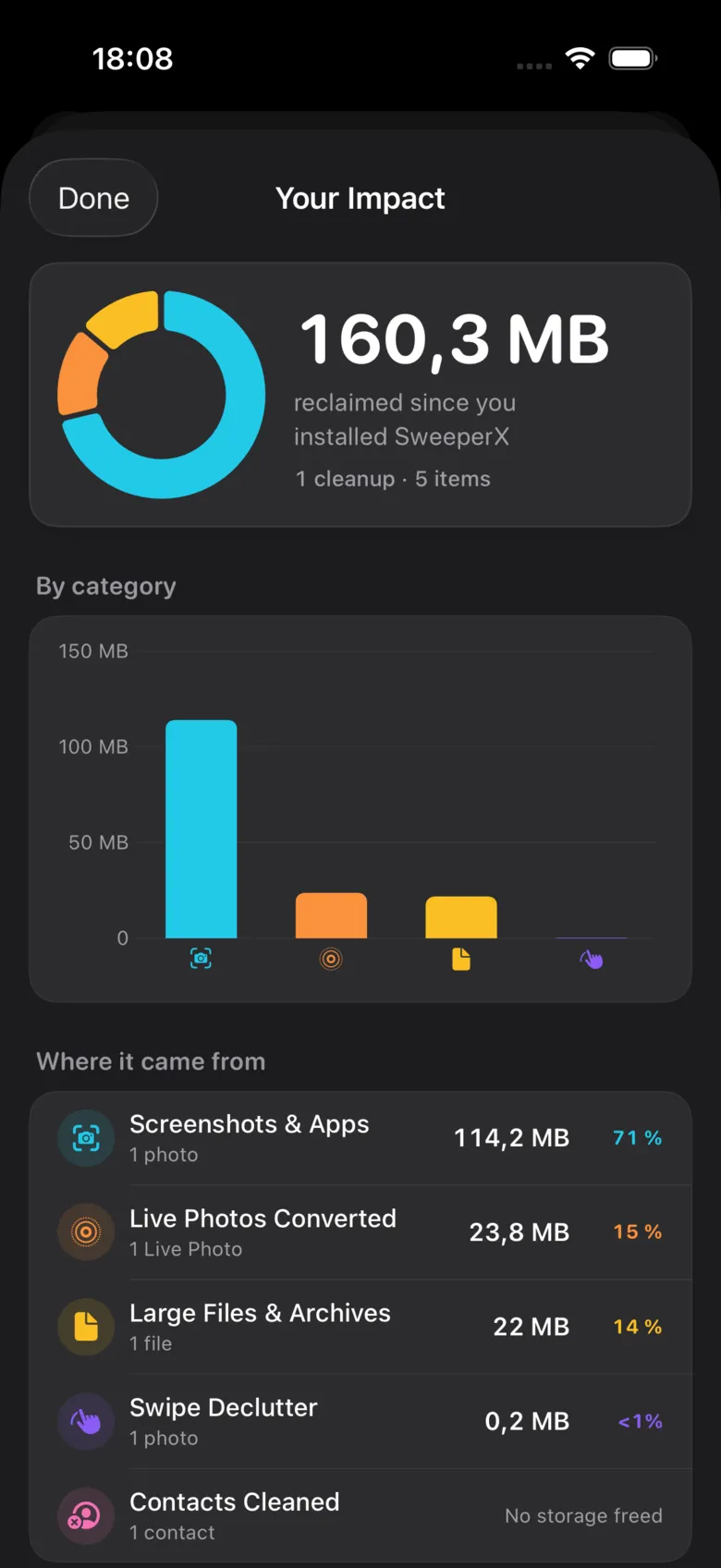
The breakdown lists each tool with its share, its byte figure and how many items it accounted for. This is the part that makes the total checkable: if Screenshots & Apps claims 71% of everything you have reclaimed, that should match your memory of having cleared a few years of screenshots, and if it does not, the detail is right there rather than folded into a single number.
The line that reports nothing
Look at the bottom row of that capture. Contacts Cleaned: 1 contact, “No storage freed”. A contact card is a few hundred bytes; merging four hundred duplicates recovers less space than one photo. The tool did real work — your address book is tidier — and it recovered nothing measurable, so that is what the screen says.
It would have been trivial to round that up to “0.4 MB” and let the total look larger. A screen designed to flatter you is not a screen you can use to check anything, which is the entire reason this one exists. Contacts Cleanup makes the same point on its own page.
Why it will not match the number in Settings
Lifetime Impact counts bytes at the moment of removal. The figure in Settings → General → iPhone Storage measures your phone right now. Those are different questions, and three things routinely separate the answers:
- Recently Deleted. Photos and videos you confirm go to the Photos app’s Recently Deleted album and keep occupying space for 30 days. Lifetime Impact records them immediately; your free space does not change until that album is emptied. This is the single most common reason the two numbers disagree.
- iCloud Photos. If your library is optimised, the file on the device was already a smaller proxy than the original in iCloud, so the space you recover locally is less than the photo’s full size — and deleting it removes it from every device on the account.
- Everything else on the phone. Between your cleanup and your next look at Settings, iOS wrote caches, apps updated and photos arrived. Your free space moves for reasons that have nothing to do with this app.
It is also the meter on the free tier
The free tier is 500 MB of lifetime reclaimed storage, and this is the counter that measures it. That wording is deliberate: it is not 500 MB per month and not a countdown that starts the day you install. It does not expire, and if you never pass it you never pay. The review bin shows the remaining allowance while you are staging, so you learn where you stand before you confirm rather than after.
Past 500 MB, SweeperX Pro is $12.99 once — no renewal, no account, no subscription.
What it will not do
- It will not gamify. No streaks, no badges, no weekly nudge telling you it has been a while since you last cleaned. It is a ledger, and ledgers do not have opinions.
- It will not leave the device. The totals live on your phone. There is no account to attach them to, no leaderboard, and nothing to upload — the app makes no network requests at all, which you can verify in about thirty seconds.
- It will not survive a reinstall. Delete the app and the history goes with it, because it was only ever stored locally. Your Pro purchase restores; the ledger starts again at zero.
- It will not delete anything. Lifetime Impact only reports. Every byte it counts was removed by a tool you ran and a batch you confirmed.
Related: Home Screen Widgets is the other tool that only ever reports — the same honesty applied to the number you have not looked at yet.